
Smart approvals gives you faster, more predictable access to cash by automatically pre-approving eligible invoices from your accounting software for funding (e.g. Xero, Sage cloud, Quickbooks online)
Instead of uploading invoices or guessing what TRIVER will approve, you’ll see ready-made offers in your account that you can use whenever you need them.
Why buyer confirmation matters
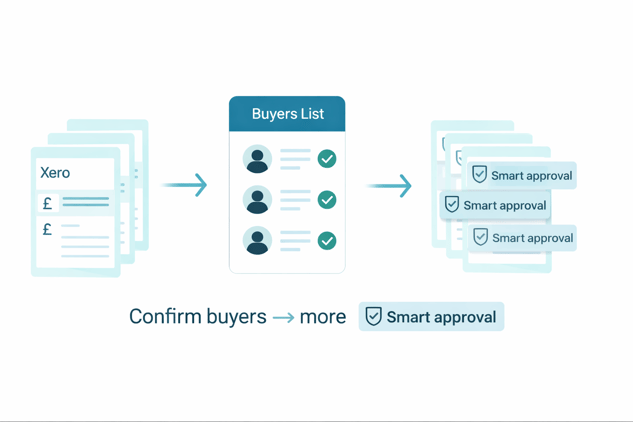
Smart approvals only work when we can clearly identify the buyer on an invoice. If a buyer isn’t confirmed yet, invoices issued to them won't be Smart-approved until they are.
Who can use Smart approvals?
Smart approvals is currently available to:
-
Selected TRIVER customers
-
Who have connected their accounting software
We’re gradually rolling this out, so you may see Smart approvals even if other businesses don’t yet. If you’re included, you might see Smart-approved invoices on your dashboard.
How Smart approvals works
-
We sync with accounting software
TRIVER regularly checks your connected account for eligible invoices. -
We review and pre-approve invoices (for confirmed buyers)
We assess each eligible invoice and pre-approve it for funding. Smart approvals only apply when the buyer is confirmed. You can check and confirm buyers in My Buyers. -
We create offers for approved invoices
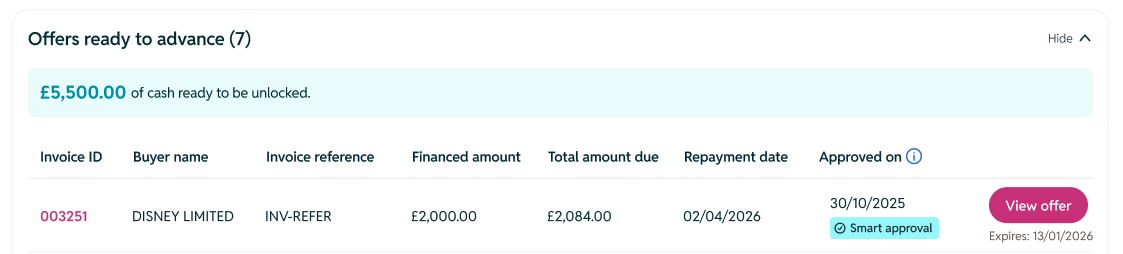
For approved invoices, you’ll see advance offers in your TRIVER account — ready to accept. -
We notify you
When new invoices are Smart-approved, you’ll get an email summarising:-
The total amount approved (£<x>)
-
The number of invoices (<y>)
-
The buyers those invoices are from
-
-
You choose what to advance
Log in, select the invoices you want to advance, accept the offers — and the money is sent to your bank account in seconds.
How to confirm my buyers (and unlock more Smart approvals)
If you have Unconfirmed buyers, invoices issued to them will not be eligible for Smart approvals yet.
To confirm them:
-
Go to My Buyers in your TRIVER account
-
Filter for Unconfirmed
-
Confirm the buyer details
Once a buyer is confirmed, invoices you issue to them can be reviewed for Smart approvals going forward.
What are the benefits?
Smart approvals is designed to make managing cash flow easier:
-
No guesswork
You can see which invoices TRIVER will fund upfront, instead of waiting for a decision. -
Less admin
No need to upload invoices or submit separate funding requests.. -
Faster access to cash
Once you accept an offer, funds are transferred to your bank account in seconds. -
You stay in control
Nothing is advanced automatically. You decide whether to advance some, all, or none of the approved invoices.
Where do I see my Smart-approved invoices?
If Smart approvals is active on your account:
-
You’ll receive an email when new invoices are approved.
-
In TRIVER, your dashboard will show any invoices that have been Smart-approved and are ready to advance.
If there are approved invoices waiting, you’ll see them right away on your dashboard.
Do I have to use Smart-approved offers?
No. You can advance as many or as little as you like.
The offers are there when you need them, so you can match your funding to your cash flow needs.
What makes an invoice “eligible”?
Smart approvals only reviews eligible invoices from your connected accounting software. Eligibility can depend on factors such as:
-
Your business profile and history with TRIVER
-
The buyer on the invoice
-
The invoice amount and due date
- The buyer on the invoice needs to be confirmed for Smart approvals to run
You may notice that some invoices are Smart-approved while others aren’t — that’s normal. You can learn more about invoices eligibility here.
If an invoice isn’t Smart-approved, it may be because the buyer is still unconfirmed. Check My Buyers to confirm them.
Is Smart approvals guaranteed?
Yes. Smart approvals is designed to give you reliable access to funding:
-
When an invoice is Smart-approved, you’ll see a clear offer in your TRIVER account.
-
The offer is ready to use as soon as you choose to advance it.
You’ll always see the exact amounts and terms before you accept any offer.
Will confirming buyers change anything in my accounting software?
No.
Do confirmed buyers guarantee Smart approvals?
No. Buyer confirmation helps unlock eligibility, but Smart approvals still depends on invoice eligibility factors.
Can I turn Smart approvals off?
If you’d prefer not to use Smart approvals, get in touch with us and we’ll be happy to help.
-
Reply directly to any TRIVER email, or
-
Contact customersupport@triver.com